
Simple Active Directory Defense:1
Kerberos, the main authentication protocol of Microsoft Active Directory, uses Service Principal Names (SPNs) to associate the instance of a service with a sign-in account.
An SPN is registered as an attribute of an AD account (computer OR user) usually when a service is installed (though it may also be set manually). It’s common to find SPNs associated with computer accounts, but user accounts may also have these registered if, for example, a service is installed and intended to run under a specific user account (effectively making it a “service account”). For example, this is often found when an IT administrator has installed Microsoft SQL Server and configured the service to run as a designated user account (usually with elevated domain privileges).
If an account has one or more SPNs registered it may be vulnerable to Kerberoasting. This attack leverages a compromised domain account to request a service ticket for a user account with a registered SPN. The service ticket is encrypted with a secret key derived from the targeted user account’s password. The threat actor may then attempt to crack the targeted account’s password offline using a password cracking tool such as hashcat or John the Ripper.
Note: Although AD computer accounts may also have SPNs registered, they are less likely to be targeted for Kerberoasting as Microsoft sets these passwords to 120 characters and changes them by default about every 30 days (helpful reference: https://adsecurity.org/?p=280).
The first line of defense against Kerberoasting is to check your domain to see if any user accounts have one or more SPNs registered. The following PowerShell command may be used to search for these accounts:
Get-ADUser -Filter {ServicePrincipalName -ne "$null"} -Properties ServicePrincipalName | Select-Object Name, SamAccountName, ServicePrincipalName
Note: The built-in ‘krbtgt‘ account SPN is expected and required – a strong password is generated automatically for this account (though it is not changed at a fixed interval)
If any user accounts have an SPN registered, you should verify whether or not it’s required. It’s not at all uncommon to find out this was done as the result of a software installation that occurred years ago. Though the application (and even server running it) has long since been removed, the SPN may still be registered.
Ideally, you’ll be able to remove any user account SPNs after verifying they are not required. There are a couple of simple ways to do this. One of the easiest ways is to use the “Attribute Editor” in Microsoft Active Directory Users and Computers. Simply locate the account, right–click, select “Properties”, select the “Attribute Editor” tab, and scroll down to “servicePrincipalName” as seen here:
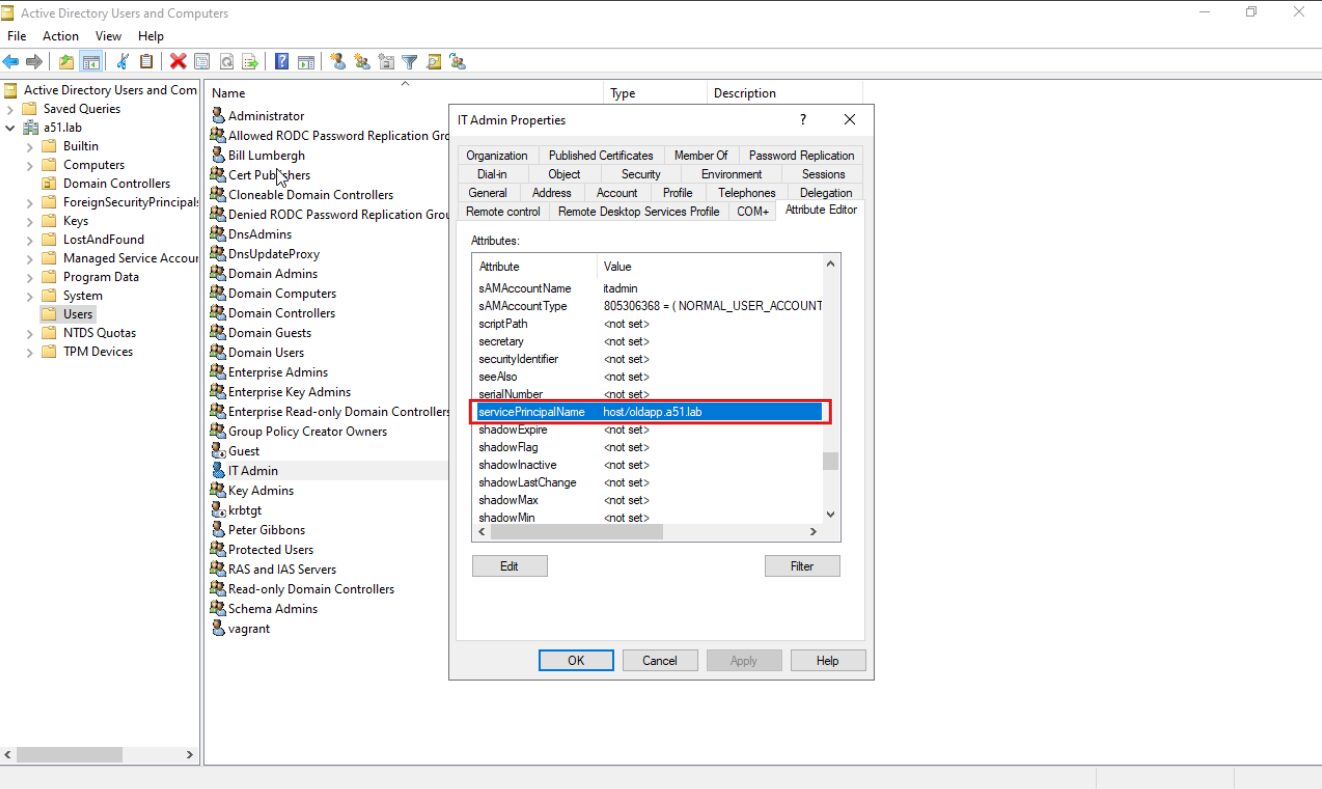
If you prefer, you may use PowerShell for this as well:
Set-ADUser -Identity <account name> -ServicePrincipalNames @{Remove="<SPN>"}
If you discover that any user account SPNs are still necessary, the most important thing you can do is to ensure that the account password is strong enough to resist offline password cracking attempts. You should strive for 32 or more random characters (a combination of uppercase, lowercase, digits, and symbols) and store the password in a secure location (e.g. a password manager).
If you’d like more information (and to see Kerberoasting in action), check out the first half of this video: https://www.5shield.com/tales-from-the-test/
Additionally, Microsoft has provided further guidance to mitigate Kerberoasting (including managed service accounts) here: https://www.microsoft.com/en-us/security/blog/2024/10/11/microsofts-guidance-to-help-mitigate-kerberoasting/